
Best Camera Apps for Nightlife and Parties
Nightlife shooting rewards fast launch, forgiving low-light preview, flash that fires correctly, and a distinctive look without editing. Here's how to evaluate any camera app against real venue conditions.
Who this guide is for
Anyone who shoots at night. Clubs, house parties, bars, concerts, dinner, low-lit streets. Whether you're documenting friends, working press, or just posting.
How this guide is written
Editorial disclosure sits at the top: Afterhours ships four cameras strong at night — NS-8, G8X MIII, DV-90, NOCT-800 — and is one of the options discussed. To handle that honestly, this guide uses a documented evaluation framework instead of a fixed leaderboard. We name the criteria, map Afterhours' nightlife cameras to specific venue types (club / party / dinner / concert / street), and describe what to look for in any other option — without summarising specific competitor pricing or claims we haven't verified. When formal hands-on testing across a full night out completes, we'll publish specific picks per venue.
What actually matters at night
Nightlife shooting is not about absolute image quality — modern iPhones out-resolve everything you're pointing them at. It's about a specific set of usability and character concerns:
- Speed from launch to shot. In a dark room with people moving, you have 2-3 seconds. Apps that take 4 seconds to launch and 2 seconds to focus have already missed the shot.
- Forgiving low-light preview. You can't see the screen well in a club. The preview needs to convey what you're framing at a glance.
- Flash behaviour that works in dark venues. Preflash blinds people. Preflash-then-burst is worse. A fixed burst is often more useable in a nightclub context.
- One-handed usability. You're holding a drink. Or standing on a crowded floor. Two-handed camera work is out.
- Distinctive look without editing. You post from your phone, at 2am, on the subway home. If the shot needs desktop editing to look good, you won't post it.
- Battery and thermal. Long night = phone gets warm and drops battery. Apps that hit the GPU harder drain faster.
- Motion handling. People moving. Lights moving. Long exposure is not your friend.
- Video support. Nightlife video is a whole category. Some apps do stills only.
Evaluation criteria
Every app can be scored against these dimensions:
- Speed from lock screen or launch to capture
- Low-light preview usability
- Flash controls and results in dark venues
- Motion handling
- Video support
- Ease of one-handed use
- Distinctive look without editing
- Export reliability
- Battery and thermal behaviour, when tested responsibly
Where Afterhours fits — the nightlife cameras
Afterhours ships four cameras specifically strong at night, each covering a different corner:
NS-8 — the NightShot camera
IR-weighted luminance signature — warm scenes brighten past true luminance, low-light AGC boosts shadow detail. This is the camera behind the site's hero footage. Hi8 camcorder character; photo and video. Free.
Best for: dark venues with warm ambient light (tungsten bars, sodium-lit streets, incandescent bathrooms with red bulbs). The IR-weighted luma will lift the scene naturally without a flash burst.
G8X MIII — slow-sync flash fusion
Fires an ambient exposure ~200 ms before the flash burst and fuses subject-from-flash over background-from-ambient at develop. Built for the classic "subject in front of a lit bar / neon sign / sunset" shot. Free.
Best for: subject-in-front-of-lit-background shots. Neon signs, party lights, sunset, city view from a rooftop. The slow-sync fusion captures both the subject (flash-lit) and the background (ambient-lit) in a single file.
DV-90 — the party cam
Internal docs literally call it "the party cam." MiniDV consumer camcorder with a locked-on fisheye adapter. Hand-held, wide, forgiving. Video only. Free.
Best for: hand-held party video. Passing the phone around, wide shots of the room, motion-heavy content. The fisheye adapter forgives framing errors.
NOCT-800 — tungsten-negative night film
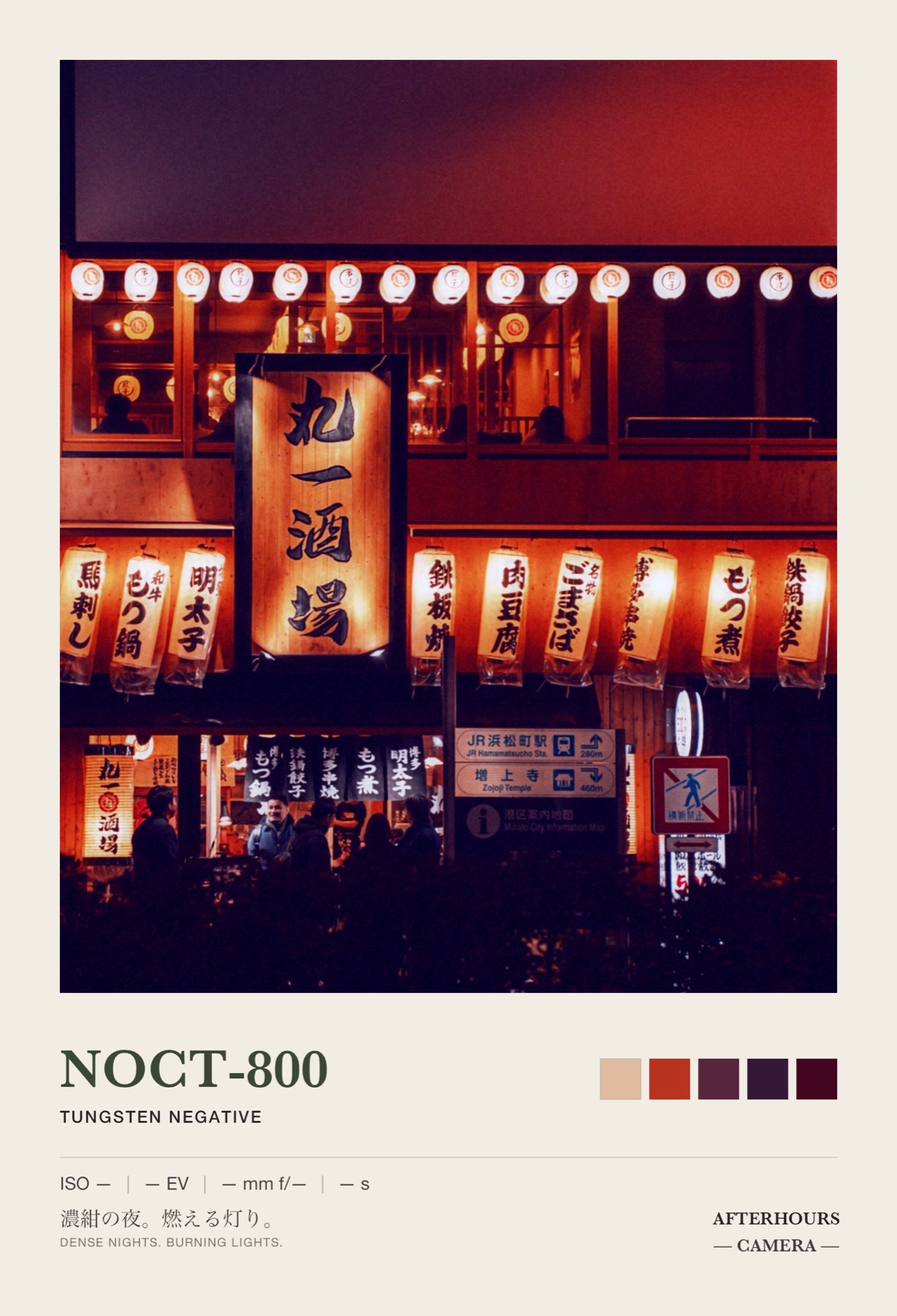
Refuses to normalise night. The AUTO-MODE shader stage is deliberately disabled so the camera can't "fix" dark scenes. Luminance-dependent colour, red halation around light sources. FILM shelf. Photo only.
Best for: atmospheric photography. Rain-slick streets, konbini interiors, tungsten restaurants, moody portraits. NOCT-800 keeps the night as night — dark shadows, cool cast, halation blooms around light sources.
Practical nightlife shooting tips
- Launch shortcut. iOS 16+ lets you assign the Camera Control button (or the lock-screen shortcut) to any camera app, including third-party. Set your primary nightlife pick as the lock-screen shortcut so it's one press away.
- Volume-button shutter. Most third-party camera apps including Afterhours respect volume-up as shutter. Practical for discreet shooting.
- Screen brightness. Turn it up before entering a dark venue. Auto-brightness struggles in club light.
- Battery reserve. Bring a battery pack. Live-shader apps drain faster than native.
- Flash discretion. Never fire flash in a live-music venue with lit stage. Bar flash is usually fine; club flash depends on venue rules. Ask if uncertain.
- Motion. For moving subjects, use apps that don't try to long-exposure. NOCT-800 refuses to normalise night, which means fast motion stays fast (with tolerable noise) rather than getting long-exposure-smeared.
- Colour cast. Tungsten and sodium venues render warm on most cameras. NightShot and NOCT-800 lean into that; other apps fight it. Choose based on what you want.
When native Camera is the smarter choice
Situations where native Camera beats every camera-simulation app:
- A shot you cannot afford to miss. Native Camera is fastest, most reliable, most tested.
- Extended-video documentation. Native Camera thermal management is best-in-class.
- Anything you need to show a bouncer or a bartender. Photos of tickets, IDs (with consent), payment codes.
- Panorama. Third-party apps rarely support this natively.
Camera-simulation apps are for the shots where the look matters more than the reliability.
Safety and venue etiquette
- Consent. Never shoot other people at events without their consent. This includes strangers in the background of your friends' photos.
- Venue rules. Most nightclubs and live-music venues have photography rules. Some prohibit flash; some prohibit any photography; some allow both. Check before shooting.
- Discretion. Discreet shooting isn't sneaky shooting. Discreet means asking permission and shooting quickly — not hiding your phone at a stranger's hip.
- Model releases. If you're publishing (Instagram, TikTok, anywhere public), and someone in the shot is identifiable, ask them.
- Under-18s. Do not shoot photos of children in nightlife contexts, ever, even at family gatherings that are legal-hours-but-alcohol-adjacent.
Being a good person at events is more important than any shot.
Related reading
- Camera Simulation vs Filters — the cornerstone argument.
- How to Choose the Best Film Camera App for iPhone — for daytime and low-key uses.
- NS-8, G8X MIII, DV-90, NOCT-800 — the individual cameras.
Frequently asked questions
What's the best iPhone camera app for a nightclub?
Depends on the venue and the shot. For NightShot-style low-light IR character, [NS-8](/cameras/ns-8) — warm scenes brighten past true luminance. For classic subject-in-front-of-a-lit-background composition, [G8X MIII](/cameras/g8x-mIII)'s dual-exposure slow-sync flash. For hand-held party video, [DV-90](/cameras/dv-90) — the internal docs call it "the party cam." For moody atmospheric stills, [NOCT-800](/cameras/noct-800) — tungsten-negative night film that refuses to normalise night.
Is the iPhone's default Camera app good enough for nightlife?
For utility shots, yes. Native Camera is fast, works with the volume-button shutter, launches from the lock screen with zero taps, and has been optimised for low light. If you need one shot to work reliably — a friend's face, a menu, a text on a screen — use native Camera.
For look-forward shooting where you want a specific aesthetic, camera-simulation apps like Afterhours give you a look that doesn't need editing. Neither is universally better.
Do camera-simulation apps drain battery faster than native Camera?
Yes, typically. Camera-simulation apps render live shaders per frame — that's the whole point. Live shaders use the GPU harder than the native pipeline. Expect roughly 1.5-2x the battery drain of native Camera during active shooting.
Practical tip: bring a battery pack for a long night. Or shoot in bursts and lock the phone between shots.
Are these apps quiet? Can I shoot without a shutter sound?
Most third-party camera apps respect the iPhone's mute switch and shipping-country regulations. Afterhours' cameras play era-appropriate shutter SFX by default, but volume is controlled by the system audio settings and the mute switch. In countries that require an audible shutter (Japan, South Korea), the shutter cannot be muted at the OS level.
What about flash — is the iPhone flash enough for nightlife?
The iPhone LED flash is bright and metered. It works for close subjects (2-3 metres) in dark environments.
Camera-simulation apps that use the flash typically fire it through their own flow: Afterhours' [G8X MIII](/cameras/g8x-mIII) does slow-sync fusion (ambient exposure 200 ms before the burst), [CZ-30](/cameras/cz-30) fires preflash-burst, [SNAP-27](/cameras/snap-27) fires a fixed single burst. Each produces different looks.
Can I shoot in Do Not Disturb mode or with the phone screen off?
Volume button acts as shutter in most third-party camera apps including Afterhours. This lets you shoot with the phone at your side or held discreetly. Screen-off shooting isn't supported by iOS for any camera app — the camera pipeline requires the app to be foregrounded.
Published by Afterhours Camera. Written by Peter Garcia. Corrections and questions: bricksandcanvas@gmail.com.